2025 Q1 Retrospective
Introduction
Q1 of 2025 flew by fast. I spent the quarter planning, building, and operating our Vision System — the project I'm currently working on. Looking back at Q1, I want to map out where I should head in Q2 and write down concrete action points.
Main
Completed Hanghae Frontend Cohort 4!
When I think back on Q1, the first thing that comes to mind is hanghae-plus. After my year-end review in late 2024, I felt I needed to shore up my fundamentals, so I joined. Through the program I studied how React works under the hood, clean code principles, and test code. You can check out the details on my personal blog. The assignments were brutally hard… but it was genuinely valuable time — I walked away with skills I could take straight into my day job.
December 2024 — TetherGuy New Business Put on Hold
This is actually something that happened last year, but… I joined in June 2024 and spent through December building a foreign exchange brokerage platform.
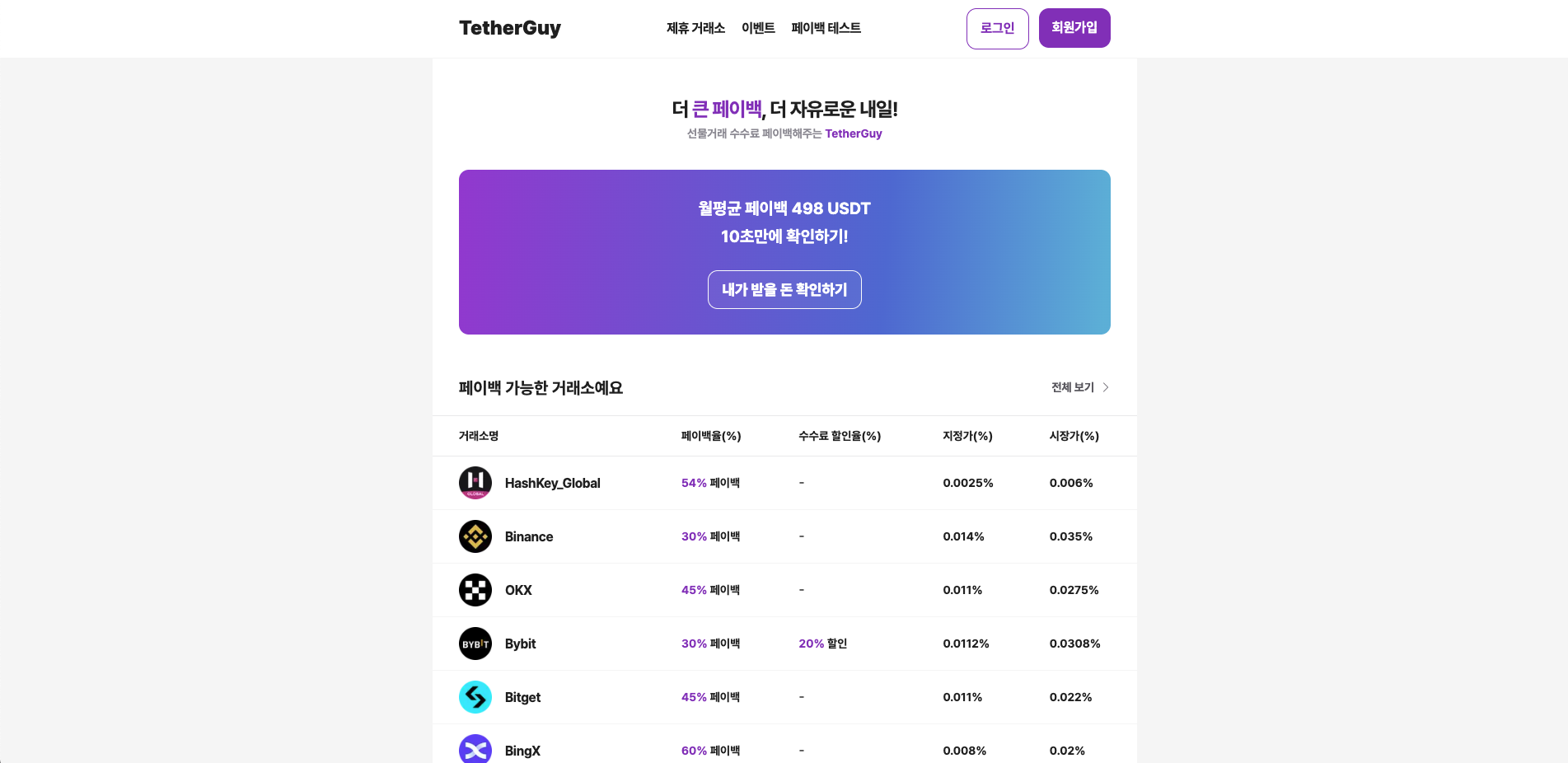
The core idea was: "If customers who use overseas exchanges trade through our platform, we'll refund their fees." Overseas exchange fees are pretty steep. The problem was that our target customers were already cutting fees through multiple competing platforms. We decided to build it anyway — but without any differentiated value proposition. I think that was one of the core reasons it failed.
The frontend tech stack was Next.js, tailwindCss, zustand, tanstack-query, storybook, and more. At the time I didn't fully understand Server Components or Next.js SSR, so I was constantly second-guessing myself as I built. I wasn't sure how to pair React Query with SSR correctly, or how to handle authentication and authorization properly. I used Next.js middleware for auth. I ran into a problem where cookies behaved differently depending on whether they were read on the server or the client — that one cost me real time. In the end I converted all components to Client Components just to hit the deadline. Looking back, jumping into the project without a solid grasp of Next.js was a mistake. The lesson: understand the basics and usage patterns before applying a technology in production. We launched the MVP but the market reception was cold. I analyzed traffic sources and bounce rates through GA and Hotjar, and we shipped a notification inbox and a coupon feature — but customers simply weren't coming in. We decided to focus on what we do well, and the platform was put on hold.
In hindsight: we failed to capture the market early, we lacked identity as a product team, we had no marketing strategy, and the barrier to entry in the space was low. I remember feeling anxious the whole time — working on a brand-new project but feeling like nothing I did was making a dent. That said, I think the experience helped me a lot when building the Vision System admin.
Developers need to be more proactive about product planning. (We need to push the limits of what's possible with the resources we have.)
There was a persistent pain point over the past eight months.
"Don't we need a product manager?"
"Wouldn't a PM solve all these problems?"
"Can you really build software without the 'brain' of a planner?"
At the time there was no data-driven decision-making at the company — not even hypotheses to validate. We were just shipping features because we could. It was suffocating. I kept pushing the idea that we needed planning, and that eventually grew into: maybe we need a PM.
But I came to realize I was wrong. I was the one shouting "agile! agile!" while what I actually wanted was a waterfall way of working.
I wanted to stay in a sequential planning → design → development process and just focus on coding. But the direction we needed to move was faster, more flexible, and more customer-centric.
Are we an organization that passively receives instructions, or one that moves proactively?
Obviously the latter — which means we need to lean in harder on planning and ownership. I wrote up a document, shared it with my teammates, and tried to push for forming a proper product team. I didn't get an enthusiastic response from the CEO, but I still think we're heading in the right direction.
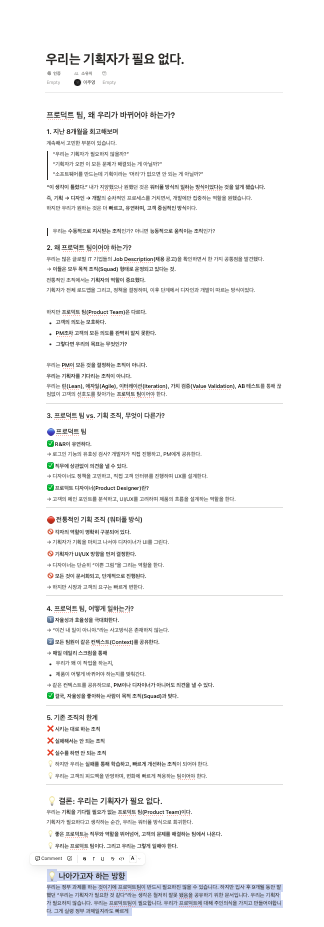
[Reference: Notion shared page]
How do I actually enjoy development?
When I trace the root of my stress at work, about 90% of it turns out to be code written in the past without any thought for extensibility — code that just barely works. Fortunately — and somewhat ironically — I'm the only frontend developer here, so at least I'm not inflicting that pain on a colleague. That's genuinely a relief. But it also means I need to be more deliberate right now: think carefully about why I'm writing code the way I'm writing it.
Working on the dashboard, I get requests like:
"Can you tweak this feature to work like this?"
"Can you attach this functionality to that feature?"
"It'd be great to see a customer's account positions and orders at a glance. Hmm…"
"The graph filter button takes a second to respond after clicking — what's going on?"
For requests like these I share estimated timelines in meetings. When I miss a deadline I committed to, I feel genuinely bad — not because anyone yells at me, but because I hold myself to it. Not being able to keep my own schedule is something I struggled with personally.
Coming back to the core question: to enjoy development, you have to get good at it. It's the same as any other pursuit — those who have, get more. Looking back, the sports and hobbies I love — basketball, chess, drums — none of them were fun at first. It was only after I understood the rules, created my own within them, and practiced consistently enough to improve that they became genuinely enjoyable. Development is exactly the same. Trying to enjoy it while you're still bad at it is a luxury you can't afford — and paradoxically, you can't actually enjoy it yet either.
So what do I do about it?
The one lever I could pull in my current environment was introducing test code. Through hanghae-plus I studied and worked on integration tests, unit tests, and e2e tests. I also studied TDD. Now I'm going to start gradually applying that knowledge at work through refactoring. Writing testable code forces functions to be purer and makes you think harder about each function's responsibility — which I believe leads naturally to more readable code.
In mid-March I introduced test code to production for the very first time. It might not sound like much, but I remember leaving the office that day feeling pretty good. In the admin project there are views that render differently depending on the user's role. As the role requirements grew more complex, verifying each case manually became a chore. So I wrote tests for it.
I used integration tests because I wanted to test multiple domains on the main page simultaneously. While writing them I learned new things: how to mock a Zustand store, how to test a component in isolation without rendering its children, and more. Here's the code. Feedback is always welcome!! (Fair warning — there's probably something worth criticizing on every single line, but I'm putting it out there anyway. Everyone starts somewhere! haha)
// Side navigation area (UI rendering and interactions based on user login state)

// Tests for user login and sign-up functionality
import { mockSessionStore } from "@/__mock__/mockZustandStore";
import { render, renderHook, screen } from "@testing-library/react";
import { useState } from "react";
import { MemoryRouter } from "react-router-dom";

import { Sidebar } from "@/pages/home";

import { VIEW } from "@/shared/lib";

vi.mock("../pages/home/ui/sidebar/AccountsSubNav.tsx", () => ({
  default: () => <div data-testid="mock-heavy-child">Mocked HeavyChild</div>,
}));

describe("Sidebar UI Tests", () => {
  it("Does the sidebar show the correct elements for an admin?", async () => {
    mockSessionStore({
      access_token: "admin",
      refresh_token: "admin",
      access_token_duration: 3600,
      role: "administrator",
      token_type: "Bearer",
    });
    const { result } = renderHook(() => useState(false));

    render(
      <MemoryRouter>
        <Sidebar
          sidebarOpen={result.current[0]}
          setSidebarOpen={result.current[1]}
        />
      </MemoryRouter>,
    );
    // TODO : This might not be the best approach — is there a better way?
    expect(screen.getByText(VIEW.HOME)).toBeInTheDocument();
    expect(screen.getByText(VIEW.PNL_TRANKING)).toBeInTheDocument();
    expect(screen.getByText(VIEW.ORGANIZATIONS)).toBeInTheDocument();
    expect(screen.getByText(VIEW.ACCOUNTS)).toBeInTheDocument();
    expect(screen.getByText(VIEW.USERS)).toBeInTheDocument();
    expect(screen.getByText(VIEW.TRANSFER_RECORDS)).toBeInTheDocument();
    expect(screen.getByText(VIEW.RISK_MANAGEMENT)).toBeInTheDocument();
    expect(screen.getByText(VIEW.DASHBOARDS)).toBeInTheDocument();
  });

  it("Does the sidebar show the correct elements for a staff member?", () => {
    mockSessionStore({
      access_token: "admin",
      refresh_token: "admin",
      access_token_duration: 3600,
      role: "staff",
      token_type: "Bearer",
    });
    const { result } = renderHook(() => useState(false));

    render(
      <MemoryRouter>
        <Sidebar
          sidebarOpen={result.current[0]}
          setSidebarOpen={result.current[1]}
        />
      </MemoryRouter>,
    );
    expect(screen.getByText(VIEW.HOME)).toBeInTheDocument();
    expect(screen.getByText(VIEW.PNL_TRANKING)).toBeInTheDocument();
    expect(screen.getByText(VIEW.ORGANIZATIONS)).toBeInTheDocument();
    expect(screen.getByText(VIEW.ACCOUNTS)).toBeInTheDocument();
    expect(screen.getByText(VIEW.USERS)).toBeInTheDocument();
    expect(screen.getByText(VIEW.TRANSFER_RECORDS)).toBeInTheDocument();
    expect(screen.getByText(VIEW.RISK_MANAGEMENT)).toBeInTheDocument();
    expect(screen.getByText(VIEW.DASHBOARDS)).toBeInTheDocument();
  });

  it("Does the sidebar show the correct elements for a regular user?", () => {
    mockSessionStore({
      access_token: "admin",
      refresh_token: "admin",
      access_token_duration: 3600,
      role: "user",
      token_type: "Bearer",
    });

    const { result } = renderHook(() => useState(false));

    render(
      <MemoryRouter>
        <Sidebar
          sidebarOpen={result.current[0]}
          setSidebarOpen={result.current[1]}
        />
      </MemoryRouter>,
    );
    expect(screen.getByText(VIEW.HOME)).toBeInTheDocument();
    expect(screen.getByText(VIEW.DASHBOARDS)).toBeInTheDocument();
  });
});
Starting from this, I began writing tests for other critical business logic in the codebase. In the first week of April I'm planning to introduce tests for the overall AUM graph and the authentication flow.
Applying FSD (Feature-Sliced Design)
I first learned about FSD through hanghae-plus in January, and since February I've been gradually applying it to the project. For more detail, my blog post might help: Applying FSD, Part 1. I'm still actively applying it, and currently studying for Part 2.
.map() doesn't only exist on Array.prototype — a cross-browser bug
One day a teammate tagged me in our internal messenger.

To reproduce and define the problem, I found that shrinking the desktop browser to a mobile viewport worked fine, but on an actual mobile device the content was invisible. I also confirmed the page was broken on Safari.
To debug the mobile error I needed a mobile debugger. A quick search turned up Chrome's chrome://inspect/#devices, which I used to check console.log() output.
The error message pointed to a problem in the table header code — specifically the header filtering logic. I first removed the filter to create a hotfix, deployed it, and merged into both main and develop.
With the Filter component removed things worked fine, so the scope was narrowed.
const PnlTable = () => {
  return (
    <Table>
      <TableHeader>
        {table.getHeaderGroups().map((headerGroup) => (
          <TableRow key={headerGroup.id}>
            {headerGroup.headers.map((header) => {
              return (
                <TableHead key={header.id} className="text-center font-bold">
                  <div className="flex w-full items-center justify-center gap-2">
                    {header.isPlaceholder
                      ? null
                      : flexRender(
                          header.column.columnDef.header,
                          header.getContext(),
                        )}

                    {header.column.getCanFilter() ? (
                      <DropdownMenu>
                        <DropdownMenuTrigger asChild>
                          <button className="flex items-center">
                            <ChevronDown />
                          </button>
                        </DropdownMenuTrigger>
                        {/* HERE : throws an error on mobile but works fine on desktop... */}
                        <DropdownMenuContent align="end">
                          <Suspense fallback={"error in Filter Component"}>
                            {/* HERE : temporarily resolved by removing the Filter component below */}
                            <Filter column={header.column} />
                          </Suspense>
                        </DropdownMenuContent>
                      </DropdownMenu>
                    ) : null}
                  </div>
                </TableHead>
              );
            })}
          </TableRow>
        ))}
      </TableHeader>
      <TableBody>...</TableBody>
    </Table>
  );
};
After commenting out the Filter component as a temporary fix, I looked more closely:
// HERE!
function Filter({ column }: { column: Column<any, unknown> }) {
  return (
    <>
      {Array.from(
        column
          .getFacetedUniqueValues()
          .keys()
          .map((option) => {
            return <>123</>;
          }),
      )}
    </>
  );
}
Something was off with the .map() call. This code was modeled after the official docs, but checking the type:
column.getFacetedUniqueValues(); // Type: Map<any, number>The Map data structure also has a .keys() method. Looking it up on the MDN docs, .keys() returns a new map iterator object — it was returning an iterator, not an array.
So does an iterator also have a
.map()method?
Yes. The .map() method can mean two different things:
Iterator.prototype.mapis listed as having limited availability — it's not yet supported in Safari. That's why the page with this feature was broken on mobile.

Previously every method in the chain was returning a value as an array. I fixed the bug by switching to Array.prototype.map explicitly.
Duplicate API calls introduced by the token refresh flow
In the current project I use react-router-dom's loader functions to handle route-level authorization and prefetch the data a page needs — all managed in one place.
export const router: ReturnType<typeof createBrowserRouter> = createBrowserRouter([
	{
  //public route
	path: publicPathKeys.root,
  element: <DefaultLayout />,
  //HERE!
  loader: DefaultLayoutLoader.AuthLayoutPage,
	  errorElement:<ErrorPage>,
  children:{
		...
  }},

  {
  // private route
  path: privatePathKeys.root,
  element: <AuthLayout />,
  //HERE!
  loader: AuthLayoutLoader.AuthLayoutPage,
  errorElement:<ErrorPage>,
  children:{
		...
  },
	}
])
The reason for using loader functions was to reduce Cumulative Layout Shift. Since react-router-dom only renders a page once data has been received from the server, the user always sees the UI with data already in place — even if the transition feels slightly slower.
The project uses axios, and I implemented auto-login by intercepting requests and responses: when a 401 error occurs, axios re-issues a new access token automatically.
But a problem came up. When a user logs in, a Slack notification is sent. The same notification fires when auto-login happens after an access token expires. The issue was that token refresh was triggering 3 Slack notifications at once. Digging into why, I found that the main page was calling 3 APIs on entry.
I was using loaders to validate auth and prefetch data on page entry — to eliminate CLS when the page renders. When the refresh token flow kicked in and a new access token was issued, the Slack notification was firing 3 times. I switched prefetchQuery to fetchQuery so that errors would propagate and the axios interceptor would run — bringing it down to 1 notification. It seems like a reasonable solution, but I suspect there's a cleaner answer. I plan to properly resolve this in April.
Starting an internal Git session and sharing it

I've been investing time in building a dev culture at FuturismLabs. I ran a session with a backend colleague to share how Git works and how to use it effectively. I ran it for about 3 weeks starting in mid-February, but things got busy and it's been on pause. I'm planning to pick it back up in April and see it through to the end.
Staying alert to security — client-side vulnerabilities
In Q1 2025 I became aware of how severe the hacking attacks on the Bybit incident and the broader crypto industry had been. It hit close to home, and I started paying real attention to security. FuturismLabs' Vision System — and every future project we build — will run in the browser, which makes it a primary target for malicious actors. I've decided that security needs to be a top priority in how we build. As a frontend developer, I want to become as fluent in the web browser as possible. I'm going to work through security concepts one by one.
Moving out on my own again after 2 years
I moved back in with my parents while job hunting. After landing a job in June 2024, I found a great place this year and moved out again. Living with family has a lot of genuine upsides, but I had this strong desire to build my own life on my own terms — so six months after starting work, I moved out. I was lucky enough to find a surprisingly affordable room near Children's Grand Park, and I'm really happy there. Getting to work out every day is something I'm grateful for!
Back to playing drums at church

Growing up I went to church with my parents, and the older guys there taught me drums and bass. That was 15 years ago — I'm 29 now. Time really does fly. Sticking with something consistently is hard, but drums are one of the few things I've never been able to fully let go of… even though there were plenty of times I wanted to. I've started practicing with a metronome again on weekends. In any field I believe fundamentals are the ceiling of your growth. The same applies to development — I'm going to keep my focus on the basics.
Physical performance — pull-ups: 2 → 8
My back was always a relative weak point. So in Q1 I focused on pull-ups. I trained mostly in the gym in the basement of the office building — started over from lat pulldowns and worked my way back up. After 3 months I can now do about 8. My goal for Q2 is to hit around 10 with better form, slower and more controlled.
Review: Using my brother's time tracker
The reason I joined hanghae-plus was to build my fundamentals — a conclusion I reached after my year-end review. While going through the program in Q1, I felt how hard it was to manage my time. It became clear that if I wanted to do more with each day, I needed to start tracking how I was actually spending it.
Using the time tracker through February and March, what struck me was the sense of how much time I was wasting. It wasn't a pleasant feeling. Every day I had to face my own failures. It showed me just how inefficiently I was using my time in Q1. But despite the wasted hours, there were also a lot of hours I fought to protect — Q1 had both.
I'm not sure I'm using the calendar perfectly yet, but I'm confident that in Q2 I'll manage my time better than Q1. Assuming nothing unexpected comes up… and life is full of surprises.
Conclusion
April Action Points
- Fundamentally resolve 2 or more problems encountered at work
- Document Git concepts and prepare a session on Merge vs. Rebase
- Build an automated container deployment pipeline to ECS using backend CI/CD
- Document insights connecting FSD's Public API pattern to bundler behavior
- Write a clear reference on the HTTP transport layer
- Document client-side security vulnerabilities (XSS and CSRF attacks)
- Write Part 2 of the Applying FSD series
- Begin studying object-oriented programming
- Begin studying functional programming
April — I'm expecting to learn harder, apply more, and contribute more to the team than anything I managed in Q1.
Have a question about this post, or curious about me? Reach out anytime.