May 2025 Retrospective
Introduction
Last month, I set out to think seriously about frontend architecture that's easy to maintain, with the goal of applying those ideas in May. The more I've pondered "how do we build software that's actually maintainable?", the more my thinking keeps converging on OOP. Some might wonder what that has to do with frontend — but the more I study it, the more I find it applies directly to React. There's a lot of genuinely valuable material to absorb, and I've been taking time to internalize it properly. I feel like I've finally started laying the groundwork for writing clean code!
May Action Points
- Write Part 2 of the FSD blog series
- Apply and learn unit/integration testing
- Object-Oriented Programming (first read-through of Clean Coders)
- Refactor with encapsulation for easier maintainability (current)
- Work on the Next.js side project (fillsLog in progress) -> Planning to start a related side project to get hands-on experience with web views
- Document the user permission policy rollout
- Build an automated container deployment pipeline to EB using backend CI/CD
Things I didn't plan but got done:
- First backend API modification and deployment
- Added auto-deletion of login history records outside a specific retention period
- Successfully renamed the backend permission from
User→Client! (Make the code maintainable!)
May is Family Month in Korea, so there were quite a few holidays — which meant more study time than usual. I used that time to go through courses on GitHub Actions and Docker, watch lectures on OOP, and read through the first half of The Art of Unit Testing. I spent time thinking about how to bring all of this into real-world practice. I'm hoping all that input from May shows up as output in June.
One thing I've come to realize: "Frontend developers need to understand OOP too." I'll explain why as we go.
Main Body
This month, I focused on implementing key features for the Vision System and building up the fundamentals of software development. I put effort into improving the developer experience internally and building things that would genuinely help the company. Along the way, I realized something about myself: what I actually enjoy isn't React development per se — it's helping colleagues and customers. React might just be the means, not the end.
Protecting Critical Data — Implementing User Roles and Permissions
The existing application only had two permission levels: ADMIN and USER.
Every employee in the company had an admin-level account, and the application held sensitive customer data and personally identifiable information.
What ifsomeone tried to use that data for something malicious...?
There have been so many hacking incidents lately that I felt we couldn't just sit on our hands. I proposed introducing a proper permission system, and the team agreed.
The decision was to restrict admin-level access to only the representative, create a separate Staff role for regular employees, and have admins explicitly grant permissions to staff — effectively tightening security.
How to implement it?
What should the data structure look like?
I drew inspiration from AWS IAM policies and proposed the idea. We ultimately agreed to implement it as RBAC (Role-Based Access Control), with data structured like this:
{
  "role": "admin",
  "privileges": ["read:domain", "write:domain", "delete:domain",...]
}
We agreed on this format — assigning a privileges array to each role.
Custom hook for checking user permissions
I needed a single place to check whether a user has a given privilege. Here's the hook I built:
// usePrivilege.ts
import { useQuery } from "@tanstack/react-query";

import { AuthQueries } from "@/entities/auths";

import { Privilege } from "../constants/privileges";
import { hasPrivilege } from "../utils";

export type Mode = "or" | "and";

export type PrivilegeProps = {
  required: Privilege | Privilege[];
  mode?: Mode;
};
export function usePrivilege({ required, mode }: PrivilegeProps): boolean {
  const { data: user } = useQuery(AuthQueries.getMyInfo());
  const privileges = user?.privileges || [];

  return hasPrivilege(privileges, required, mode);
}

// utils > hasPrivilege
export function hasPrivilege(
  userPrivileges: string[] = [],
  requiredPrivilege: Privilege | Privilege[],
  mode: Mode = "or",
): boolean {
  const requiredList = Array.isArray(requiredPrivilege)
    ? requiredPrivilege
    : [requiredPrivilege];

  if (mode === "and") {
    return requiredList.every((requiredPrivilege) =>
      userPrivileges.includes(requiredPrivilege),
    );
  }

  return requiredList.some((requiredPrivilege) =>
    userPrivileges.includes(requiredPrivilege),
  );
}
I started by building the usePrivilege hook. It fetches the user's state, checks the privileges array, and compares whether the requested privilege is among those the user holds. At first I put all the logic inside the hook itself, but I realized there could be more complex cases.
When controlling UI based on permissions, you might need logical operations like AND or OR — for example, "show this if the user has at least one of these two permissions" vs. "show this only if the user has all five permissions."
So I extracted it into a utility function called hasPrivilege, using every and some to handle both cases. If you see a better structure or have questions, please feel free to share — I'm genuinely curious whether there's a cleaner approach!
How should we control UI on the frontend?
Now, how do we actually control UI elements scattered all over the app based on permissions? I figured I needed a component dedicated to that responsibility.
import { ReactElement, ReactNode, cloneElement, isValidElement } from 'react';

import { useToast } from '../lib';
import { PrivilegeProps, usePrivilege } from '../lib/hooks/usePrivilege';
import NoPrivilegeOverlay from './NoPrivilegeOverlay';

type PrivilegeGateProps = PrivilegeProps & {
  children: ReactNode;
  render?: 'hide' | 'disabled' | 'custom';
  variant?: 'page' | 'card' | 'section' | 'inline';
};

const PrivilegeGate = ({
  required,
  children,
  mode,
  render = 'hide',
  variant = 'page',
}: PrivilegeGateProps) => {
  const hasAccess = usePrivilege({ required, mode });
  const { toast } = useToast();

  if (hasAccess) return <>{children}</>;

  if (render === 'disabled') {
    if (isValidElement(children)) {
      const onClick = () => {
        toast({
          title: 'You don't have permission to perform this action.',
        });
      };

      return cloneElement(children as ReactElement, {
        onClick,
        style: { pointerEvents: 'auto', opacity: 0.5, cursor: 'not-allowed' },
        title: '권한이 없습니다',
      });
    }

    return null;
  }
  if (render === 'custom') {
    return <NoPrivilegeOverlay variant={variant} />;
  }

  return null;
};

export default PrivilegeGate;
This is the current PrivilegeGate component. As requirements have gradually been added, the if-branches are multiplying... I'll figure out a better approach when it becomes a real problem.
For now, it's a component that receives child components and changes what it returns based on conditions.
For example, if a specific button needs to be controlled based on permissions, you'd implement it like this:
import ...

export const CreateHistoricalSnapshotButton = ({
  dashboardItem,
  openModal,
  closeModal,
}: { dashboardItem: Dashboard } & ModalHandlerProps) => {
  const handleCreateClick = () => {
    openModal(
      <CreateSnapshotForm
        accountId={dashboardItem.accountId}
        onClose={closeModal}
      />,
    );
  };

  return (
    <PrivilegeGate
      render="hide"
      required={PRIVILEGES.CREATE_HISTORICAL_ACCOUNT_SNAPSHOT}
    >
      <Button onClick={handleCreateClick} variant="auth">
        Create Snapshot Records
      </Button>
    </PrivilegeGate>
  );
};
At first I thought it was fine to put PrivilegeGate at the top of the component. But thinking it through, I realized that CreateHistoricalSnapshotButton doesn't need to know anything about permissions. So I moved the gate outside the component:
import ...

export const CreateHistoricalSnapshotForm = ({...}) => {

  return (
   <>
   ...
    <PrivilegeGate
      render="hide"
      required={PRIVILEGES.CREATE_HISTORICAL_ACCOUNT_SNAPSHOT}
    >
      <CreateHistoricalSnapshotButton .../>
    </PrivilegeGate>
    </>
  );
};
I think the right approach is to have the UI-controlling component visible above its target — it looks a bit messy from the outside, but from the component's own perspective, this feels correct.
But wait... does the server have to manually notify the frontend developer every time a permission changes?
This was another nagging concern. There's an array of privilege strings for each role, and whenever the server-side adds or modifies them via CRUD, how do we keep the client in sync? Right now, someone has to tell me and I fix it manually...
I thought this could be solved with a script and CI/CD.
import ...

// Load dotenv
const __filename = fileURLToPath(import.meta.url);
const __dirname = path.dirname(__filename);

const API_BASE = "개발_서버_URL";
const LOGIN_EMAIL = "개발_서버_이메일 ";
const LOGIN_PASSWORD = "개발_서버_비밀번호";

const OUTPUT_FILE = path.resolve(
  __dirname,
  "../src/shared/lib/constants/privileges.ts",
);

// Convert privilege string to constant key format
function toConstKey(privilege: string): string {
  return privilege.toUpperCase().replace(/[^A-Z0-9]/g, "_");
}


async function loginAndGetToken(): Promise<string> {
  const res = await axios.post(
    `${API_BASE}/v1/login`,
    {
      username: LOGIN_EMAIL,
      password: LOGIN_PASSWORD,
    },
    {
      headers: {
        "Content-Type": "multipart/form-data", // Set FormData transmission format
      },
    },
  );

  const token = res.data.access_token;
  if (!token) {
    throw new Error("❌ 로그인 성공했지만 토큰이 없습니다.");
  }
  return token;
}

async function fetchPrivileges(token: string): Promise<string[]> {
  const res = await axios.get(`${API_BASE}/v1/administrators/me`, {
    headers: {
      Authorization: `Bearer ${token}`,
    },
  });
  return res.data.data.privileges;
}

async function generate() {
  try {
    const token = await loginAndGetToken();
    const privileges = await fetchPrivileges(token);

    const entries = privileges
      .map((p) => `${toConstKey(p)}: '${p}',`)
      .join("\n  ");

    const content = `// ⚠️ This file is auto-generated for role ADMIN. Do not edit manually.
        export const PRIVILEGES = {
        ${entries}
        } as const;


export type Privilege = (typeof PRIVILEGES)[keyof typeof PRIVILEGES];
`;
    fs.writeFileSync(OUTPUT_FILE, content, "utf-8");
    console.log(
      `✅ privileges.ts generated for role ADMIN with ${privileges.length} privileges.`,
    );
  } catch (err) {
    console.error("❌ Failed to generate privileges.ts");
    console.error(err);
  }
}

generate();
After three weeks studying Clean Coders, I look at my own code and see a lot to fix... but I'm sharing it anyway. Feedback welcome!
This script logs in, fetches the privileges, and generates them into a constants file. I set it up to run before the build step — and it turns out there's something called prebuild for exactly that.
//package.json
{
   ...
  "scripts": {
    "dev": "vite --host 0.0.0.0",
    "generate:privileges": "node --loader ts-node/esm scripts/generate-privileges.ts",
    "prebuild": "npm run generate:privileges",
    "build": "vite build --debug",
    "preview": "vite preview --port 8080",
    "prettier": "prettier --write .",
    "test": "vitest",
    "prepare": "husky",
    "lint-staged": "lint-staged",
    "steiger": "npx steiger ./src --watch"
  },
}
With this in place, the script runs before every build and syncs the privilege list. If the privilege checkboxes are mapped from the generated array, server-side privilege changes no longer require a manual notification to the frontend developer.
Reader — what problems do you see in the code above? Is there a better approach?
2. If It's Inconvenient, Fix It!
Bottom line: I modified the backend API.
As I was implementing the role-based permissions described in section 1, I noticed the API endpoints were split up by role:
GET / Admin list : /members/administrators/allGET / Staff list : /members/staff/allGET / User list : /members/users/all
GET / Single admin : /members/administratorGET / Single staff : /members/staffGET / Single user : /members/user
They were divided like this.
This meant the frontend had to branch on which API to call depending on the role — which made implementing the UI unnecessarily complicated.
I wanted to consolidate them like this:
GET / Member list : /members/all?role=${role}
GET / Single member : /members?role=${role}&id=${id}
No matter how I looked at it, this is an admin-only feature and it's all about querying members — there's no reason the endpoints need to be separate. It made more sense to push the branching logic to the server. So I modified the backend accordingly.
The backend is built with FastAPI and follows the repository design pattern. It's not perfect, but here it is — if anything looks off, please leave a comment!
// Admin controller
@router.get(
    "/members/all",
    response_model=CommonResponse,
    tags=[Tag],
    responses={...}
)
async def get_all_member_async(
        role: Role,
        administrator_token_data: AdministratorTokenData = Depends(JWTHandler.is_administrator())) -> JSONResponse:
    if role == Role.Administrator:
        return await administrator_service.get_all_administrators_async(administrator_token_data=administrator_token_data)

    if role == Role.Staff:
        return await administrator_service.get_all_staff_async(administrator_token_data=administrator_token_data)

    if role == Role.Client:
        return await administrator_service.get_all_users_async(administrator_token_data=administrator_token_data)
This implementation dispatches to a different service based on the incoming role. I expected it to cut through the complexity on the frontend in one shot — but the process of modifying and deploying this turned out to be quite an ordeal...
The backend source code changes were hard to land, but in the end I set up automated CI/CD so anyone can collaborate without manual steps. (I invested every spare hour outside of work for 3 days.)
AS-IS
My colleague runs Windows; I run macOS. The backend stack is Python + FastAPI, deployed on AWS Elastic Beanstalk — all manually. Three months ago I ran a git branching session for the team, so we were at least managing separate branches, but we were still zipping up each branch's source code and deploying by hand.
TO-BE After a lot of trial and error, I landed on the following YAML configs for fully automated deployment from any environment:
name: Deploy to the Development, AWS Elastic Beanstalk

on:
  pull_request:
    types: [closed]
    branches:
      - develop

jobs:
  build:
    runs-on: ubuntu-latest

    steps:
      - name: Checkout code
        uses: actions/checkout@v4

      - name: Set up Python
        uses: actions/setup-python@v4
        with:
          python-version: "3.10"

      - name: Install dependencies
        run: |
          python -m pip install --upgrade pip
          python3 -m pip install pipreqs
          pipreqs . --force
          pip install -r requirements.txt

      - name: Zip the application
        run: |
          zip -r vision-system.zip .

      - name: Deploy to AWS Elastic Beanstalk
        uses: einaregilsson/beanstalk-deploy@v22
        with:
          application_name: Vision-System
          environment_name: Vision-System-development-backend-server
          version_label: ${{ github.sha }}
          region: ap-northeast-2
          aws_access_key: ${{ secrets.AWS_ACCESS_KEY_ID }}
          aws_secret_key: ${{ secrets.AWS_SECRET_ACCESS_KEY }}
          deployment_package: vision-system.zip
use_existing_version_if_available: truename: Deploy to the Production, AWS Elastic Beanstalk
on:
push:
branches:
- main
pull_request:
types: [closed]
branches:
- main
jobs:
build:
runs-on: ubuntu-latest
steps:
- name: Checkout code
uses: actions/checkout@v4
- name: Set up Python
uses: actions/setup-python@v4
with:
python-version: "3.10"
- name: Install dependencies
run: |
python -m pip install --upgrade pip
pip install -r requirements.txt
- name: Zip the application
run: |
zip -r vision-system.zip .
- name: Deploy to AWS Elastic Beanstalk
uses: einaregilsson/beanstalk-deploy@v22
with:
application_name: Vision-System
environment_name: Vision-System-production-backend-server
version_label: ${{ github.sha }}
region: ap-northeast-2
aws_access_key: ${{ secrets.AWS_ACCESS_KEY_ID }}
aws_secret_key: ${{ secrets.AWS_SECRET_ACCESS_KEY }}
deployment_package: vision-system.zip
use_existing_version_if_available: trueI set it up to trigger on merges to the develop branch and the main branch respectively. The two configs are nearly identical — the only real differences are the trigger condition and the AWS EB environment name. There's probably a way to deduplicate them, but for now, this is where May landed. I'll clean it up in June!
3. How Do We Get Our Colleagues More Sleep?
On May 21st, during an all-hands meeting, someone raised the point that as the customer base grows, keeping up with customer support is becoming physically unsustainable. Most of our customers are overseas, and when there's a loss, they reach out via Telegram — at all hours. No fixed schedule means being on edge around the clock, losing sleep.
As a startup, fast response times are one of our competitive edges. So what do we do?
Is there anything I can help solve through code?
The idea that came up in the meeting: proactively send customers weekly and monthly profit/loss summaries with context and supporting information.
At that point I wondered — as the customer base keeps growing, can we really keep doing this manually? The reports would contain a lot of per-customer performance data. So I proposed automating it.
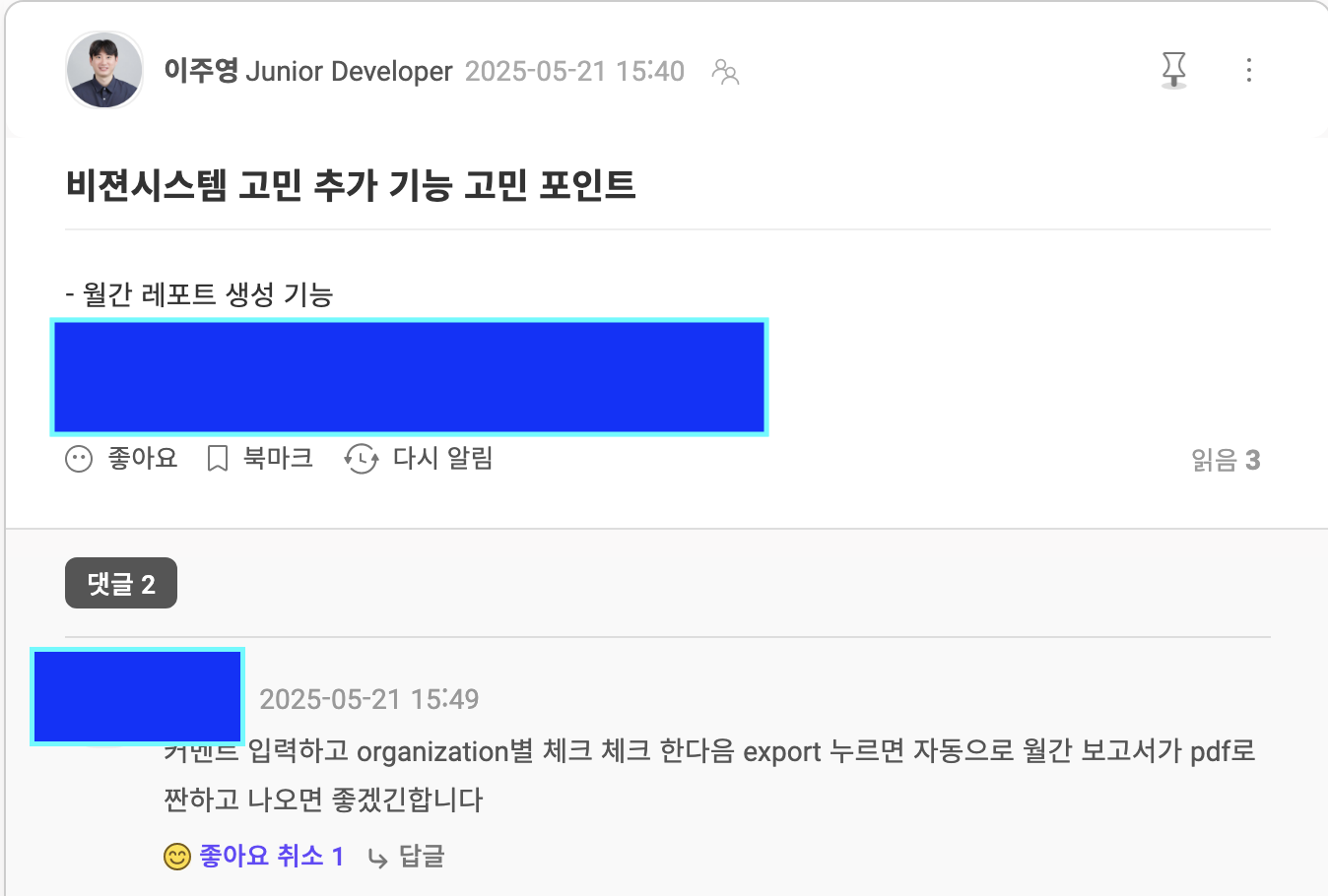
My colleague loved it. In that moment I thought: this is what it's about. This is what makes the work fun — knowing you can actually help.
Now I need to figure out how to build it. I've opened a can of worms, and June is going to be interesting. Let's go!
4. Opening My Eyes to OOP
Since April, as I've been studying how to build more maintainable software, everything keeps converging on OOP. I plan to write a dedicated post about this.
The Clean Coders lecture series by Myungsuk became available on Inflearn, so I did two full read-throughs. Each pass revealed more. Honestly, up through about 60% it was genuinely rewarding — but after that it shifted into TDD territory, and I didn't fully absorb all of it. I think a few more passes will open it up further.
5. Secure Coding — Finding a Career Direction
Hacking incidents in the crypto industry have been surging. Beyond the two that made headlines recently, there are many more.
-
Bybit Exchange Hack (February 2025)
Approximately $1.5 billion worth of Ethereum was stolen from Bybit, a Dubai-based crypto exchange. The US FBI attributed the attack to North Korea's Lazarus Group.
-
WazirX Exchange Hack (July 2024)
Approximately $234.9 million worth of crypto assets were stolen from WazirX, an India-based exchange. This incident has also been linked to the Lazarus Group.
Countless other hacks, large and small, are happening all the time. I can't just watch. As a frontend developer, I feel I need to understand the web browser better than anyone. So I'm starting to study this area — understanding where the vulnerabilities lie. First: what attack surfaces exist in the browser itself, and what does the server side look like?
This knowledge might not produce visible results right away, but it's an opportunity to reverse-engineer how deeply browsers think about security — and in the process, deepen my understanding of the browser itself.
So concretely, what security improvements did I actually make in May?
I improved the auth/authorization layer in the Vision System project. I prevented refresh tokens from being accessible via JavaScript, strengthened security by controlling HTTP headers on the server side, and introduced the permission system described in section 1.
Conclusion
May was a month of studying OOP and unit testing to write more maintainable code, while on the practical side spending a lot of time on security-related work. That focus on security sparked a real interest — I found myself thinking that protecting applications, companies, and society from malicious attacks might genuinely be something I care about. I closed out May with the intention of becoming a true expert in the web. So in June, I plan to go well beyond the basics and document frontend-specific hacking techniques — both historical and emerging — in concrete, practical detail.
Thanks for reading this far. Keep at it, everyone, wherever you are!
June Action Points
Development
- Implement the monthly report generation and storage feature (let's get our colleagues more sleep!! let's go)
- Establish the design system workflow at FuturismLabs
- Read Objects and Roles: A Gentle Introduction to Object-Oriented Programming and write up thoughts
- Finish The Art of Unit Testing and write up thoughts -> Start with the easiest frontend logic and apply unit tests!
- Gather and share insights from the Next.js study group (no mindless participation allowed)
- Expand my thinking through networking fundamentals
- Study databases — PostgreSQL
Security
- Study XSS and write up findings
- Study CSRF and write up findings
- Deep-dive into OAuth and write up findings
Have a question about this post, or curious about me? Reach out anytime.